
Introducing Cline SDK: the upgraded agent runtime, and we rebuilt Cline upon it
Before “agents” became a buzzword, Cline was the first real agentic coding experience. Cline started with the VSCode extension and helped a generation of developers step into AI coding. It was a great VS Code extension, but as the technology evolves, it also taught us something uncomfortable: the architecture that got us there was not the modular and extensible framework we would choose for what comes next.
It was definitely the cost of being early.
We started where many early agent products did: inside the product surface itself. The extension came first, and the agent loop grew inside it as new use cases emerged: terminal integration, computer use, subagents, multi-agent teams, custom tools. The product kept getting more capable, but the runtime was becoming harder to separate from the IDE around it. Eventually, it made the system harder to maintain, extend, embed, and reuse.
So for the next phase of Cline, we rebuilt the foundation instead of adding another layer of patches. We abstracted our core agent harness into a plugable agent sdk (@cline/sdk). It powers Cline across VS Code, JetBrains, and the CLI; we are also open-sourcing the SDK so that any team can build on, including ourselves: npm i -g @cline/sdk
At the center of that redesign is the improved agent harness and architecture that treats the runtime as a shared service, not just an implementation detail of a single product. That shift changes the kinds of agents Cline can support: long-running work no longer dies with a UI restart; Sessions can move across surfaces; the low-level agent loop stays stateless and reusable, while the runtime around it becomes durable, portable, and product-agnostic.
Best-in-class agent harness
With Cline 2.0, we invested heavily into improving our harness. We rewrote the prompts, simplified the loop, tightened context management, improved feedback loops and error handling, and rethought how tools are defined and surfaced to the model. Those gains carry across every Cline surface because they live in the runtime, not the app.
Terminal Benchmark scores
Frontier models
Note: Cline CLI has pass@1 scores; N/A = no published run for that agent + model combination on tbench.ai (terminal-bench 2.0).
Open weights models
Source: Both OpenCode and Pi-Code don’t have publicly released benchmark numbers on open-weights models; These runs were performed by the Cline team with latest Cline,OpenCode CLI and PI-Code as of May 8, 2026 with pass@1 scores
We also see the new CLI complete the same tasks faster and at lower token cost than the old one in internal runs.
A stable architecture for anyone to build on
Pulling the engine out of the extension changes our role. Cline is no longer the only place this runtime can live; it is one product built on top of the same SDK we are opening up. We already migrated our CLI into the new SDK architecture. We are in the process of migrating our IDE extensions as well.
Cline 2.0 is a layered TypeScript stack. Each layer has a single responsibility and depends only on the layer beneath it.
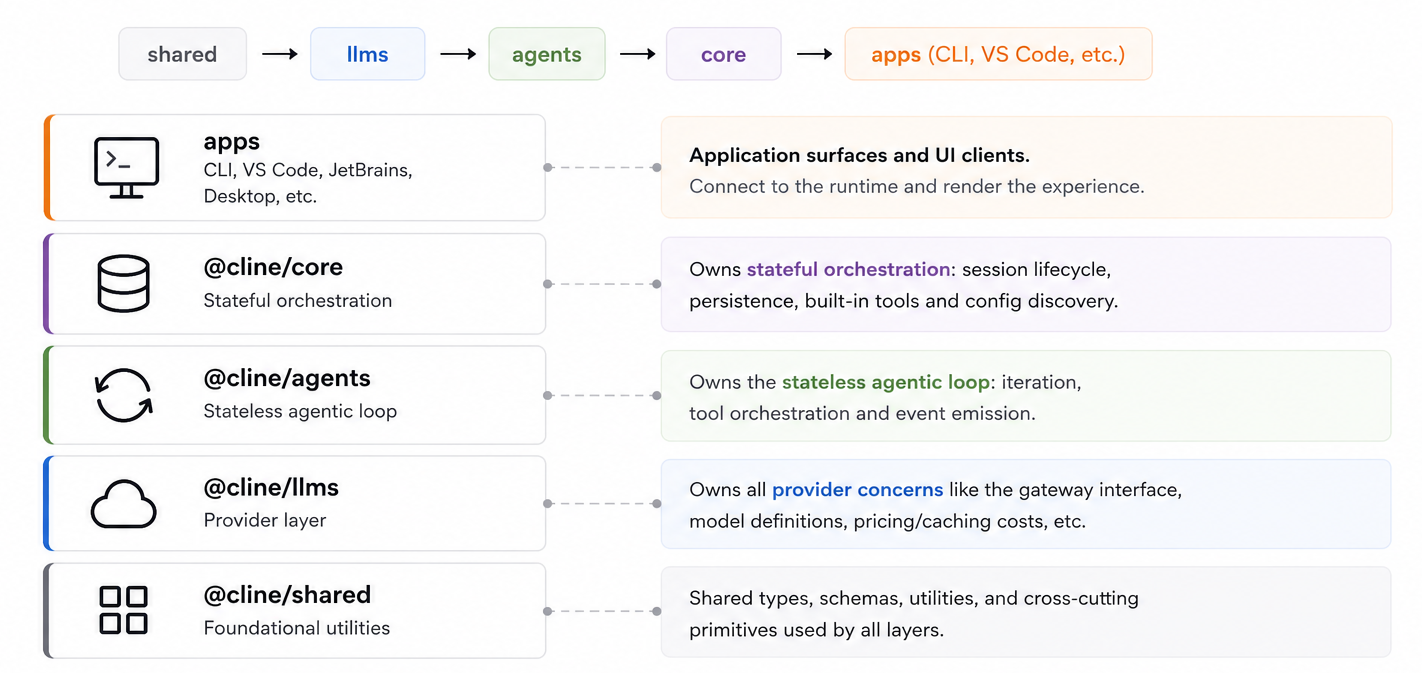
Install @cline/sdk when you want the full stack. Use the individual packages when you want a smaller surface, such as the provider layer for an LLM proxy or the stateless loop for a serverless runtime. The stack is designed so that you can start small and add the stateful runtime only when they need it.
A rich feature set out of the box
Plugins at the runtime layer
Plugins are how teams add domain-specific behavior without forking the runtime. A plugin can register tools, observe lifecycle events, add rules and commands, and shape what the agent sees.
Plugins can be loaded from configured paths or workspace locations. They can start as a local .ts or .js module and later become a package directory with a cline.plugins manifest, so teams can prototype locally and package reusable capabilities when they harden.
See working plugin examples under examples/plugins/.
Beyond plugins, Cline SDK also provides other extensible points like custom tools, MCPs, skills etc. to give developers easy mechanisms to customize their agents.
Open choice on any providers and models
Within our core of open-source, we also want to give developers and users the “open-choice” for agents across models and providers. Cline’s provider layer supports Anthropic, OpenAI, Google, AWS Bedrock, Mistral, LiteLLM, and OpenAI-compatible endpoints such as vLLM, Together, Fireworks, etc. Switching providers should be as easy as a config change.
Provider logic lives in @cline/llms, keeping model catalogs, provider settings, and handler behavior out of the agent loop.
To add a new custom provider, simply implement an ApiHandler and register it with llms.registerHandler("my-provider", handler).
Agent Teams without a separate orchestration layer
Some work is too large or too ambiguous for one single agent. The SDK includes agent teams and subagents natively, so a session can delegate to specialists, track progress, and exchange handoff notes, all inside the same core runtime. No need to implement orchestration yourself.
Subagents run with their own model, tools, and prompts The bundled plugin exposes tools for starting subagents, messaging them, reading status, and storing handoff notes, so teams can experiment with multi-agent workflows without building the orchestration from scratch.
Plus the things you'd expect
Scheduled CRON jobs, checkpointing, Web search, MCP connectors all handled natively out of the box.
Rebuilt Cline with the new SDK
We are in the process of migrating all Cline applications used by over 7m developers onto this improved SDK harness. Our CLI and kanban are already built upon the latest SDK; and we are in the process of migrating our VS Code and Jetbrains extensions.
Cline CLI available everywhere
With upgrading our CLI, we also introduced experimental connector channels to easily connect your agents with Telegram, WhatsApp, Slack and other platforms, to make your agent available everywhere.
Setup via Cline CLI interactive wizard: cline connect
Getting started
Install @cline/sdk, try the examples, and tell us what breaks. We are still learning from the people building with Cline.
Build the support bot that reads your codebase before answering. Build the nightly agent that audits dependencies, opens PRs, and assigns reviewers. Build the multi-agent workflow that turns a one-line bug report into a tested fix. Build the IDE integration, internal tool, or connector we have not built yet. The runtime is open because the use cases should not be limited to the surfaces we ship ourselves.
# Install our SDK
npm install @cline/sdk

# Check out our new CLI
npm i -g @cline

# …or give your agent the Cline SDK skill
npx skills add cline/sdk-skill
Find more resources below:
- More app examples built upon Cline SDK: sdk/apps/examples/
- Plugin and hooks, cron examples on SDK: sdk/examples
- Docs: docs.cline.bot/sdk
- Discord: discord.gg/cline
A note on our inspirations
The original Cline was one of the first projects to use agentic tool calling with Sonnet 3.5, an idea novel for its time and what made Cline feel like magic. This was before Claude Code, Codex, and the wave of agents that followed.
We've had countless opinionated debates along the way ourselves: RAG vs. grep, long prompts vs. short ones, which tool calls to expose and how, and dozens of other questions where every coding agent has taken its own path. We’ve also seen how the industry has progressed and has drawn inspiration from other open source projects and frontier coding agents. Cline 2.0 is the manifestation of those learnings, inspirations, failures, and growth.
We're deeply grateful to everyone we've learned from along the way.
Made with ❤️ by the Cline team