A practical guide to hill climbing
A potential partner asked for Cline's benchmark numbers. At the time, third-party benchmarking had us behind Cursor, Claude Code, and other agents. We didn't have a systematic way to measure or improve our performance. Over a weekend, three of us ran Cline against Terminal Bench's 89 real-world coding tasks, diagnosed every failure, and shipped targeted fixes. We improved our score from 47% to 57%, putting us ahead of Claude Code, OpenHands, and OpenCode.
This guide outlines the process of hill climbing that we used to benchmark model/agent combo and improve its score. While this was built for Cline, the process works with Claude Code, Codex, OpenHands, Cursor, Gemini CLI, or any other model/agent combo you like.
What is Hill Climbing?
Hill climbing is an iterative improvement process for AI agents/models. You run an AI coding agent on a standardized set of coding tasks, measure the score, change one thing (a prompt tweak, a bug fix, a config flag), run again, and keep the change if the score goes up. Revert if it goes down. Repeat.
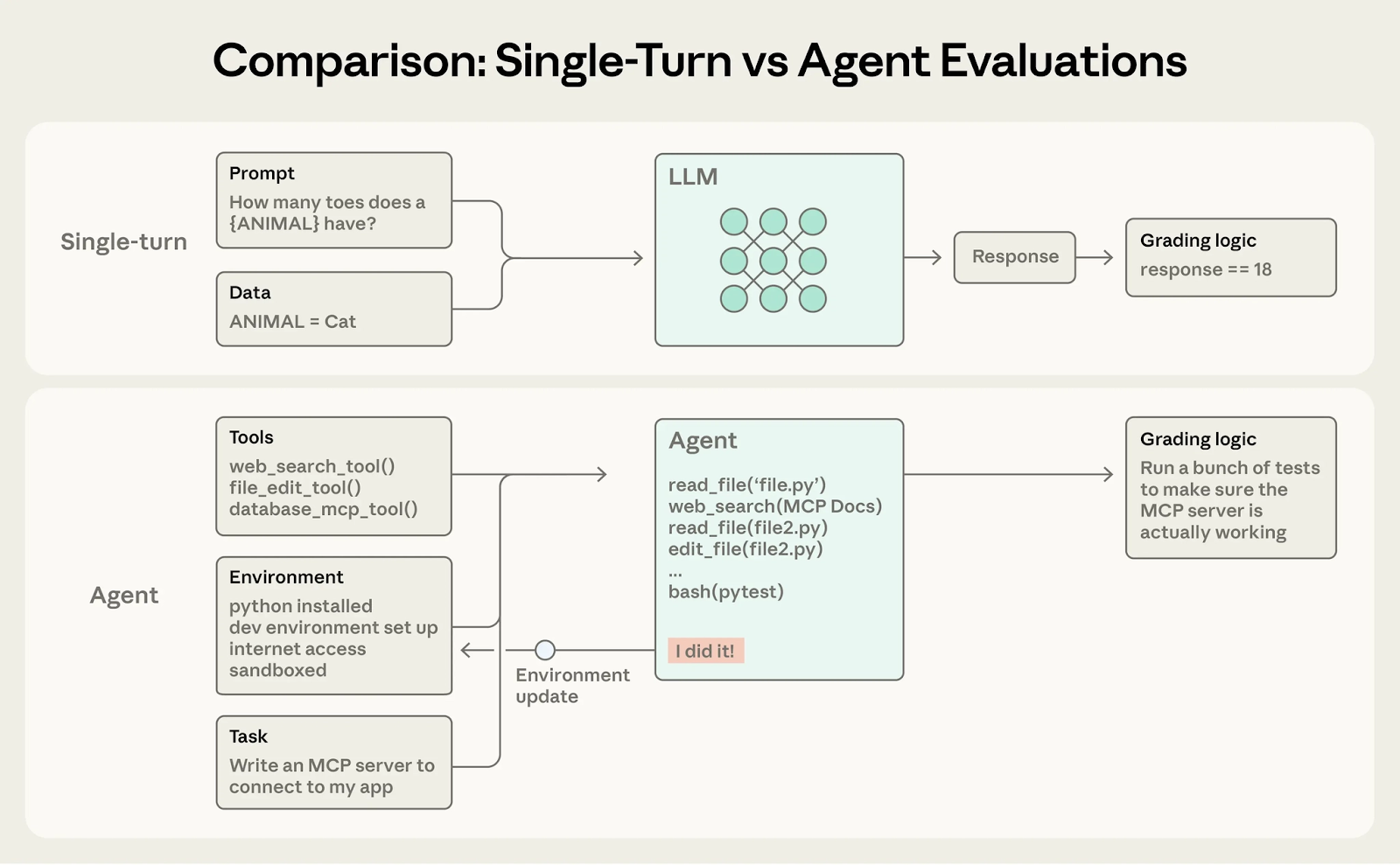
Most coding agent evaluations are either single-turn or too saturated. However, the Terminal Bench has created problems and verifiers that test the entire agentic flow, allowing you to test the full range of tasks your coding agent could do and grade the entire set of steps it performs. There’s a ton that’s been written about building high quality evals for AI agents and Anthropic’s ‘Demystifying evals’ blog (link) dives into how to design and run high‑quality evals.
Prerequisites
There are some pre-requisites to make the infra+model+inference setup, but once you're done you have an active pipeline that can easily run dozens of eval tests in parallel really fast. These instructions assume you already have Python, Docker(optionally Modal/Daytona) and uv installed on your machine.
For this guide the main tool we use is Harbor. Harbor is a widely-adopted agent evaluation framework, built by the creators of Terminal-Bench. It abstracts away sandbox management, agent loop, and rollout monitoring for evals.
A Harbor task is a simple directory. Harbor handles the full trial lifecycle: spinning up the sandbox, running the agent, verifying the result, and tearing everything down. It also supports different datasets so you can swap between them if you have different goals to optimize for.
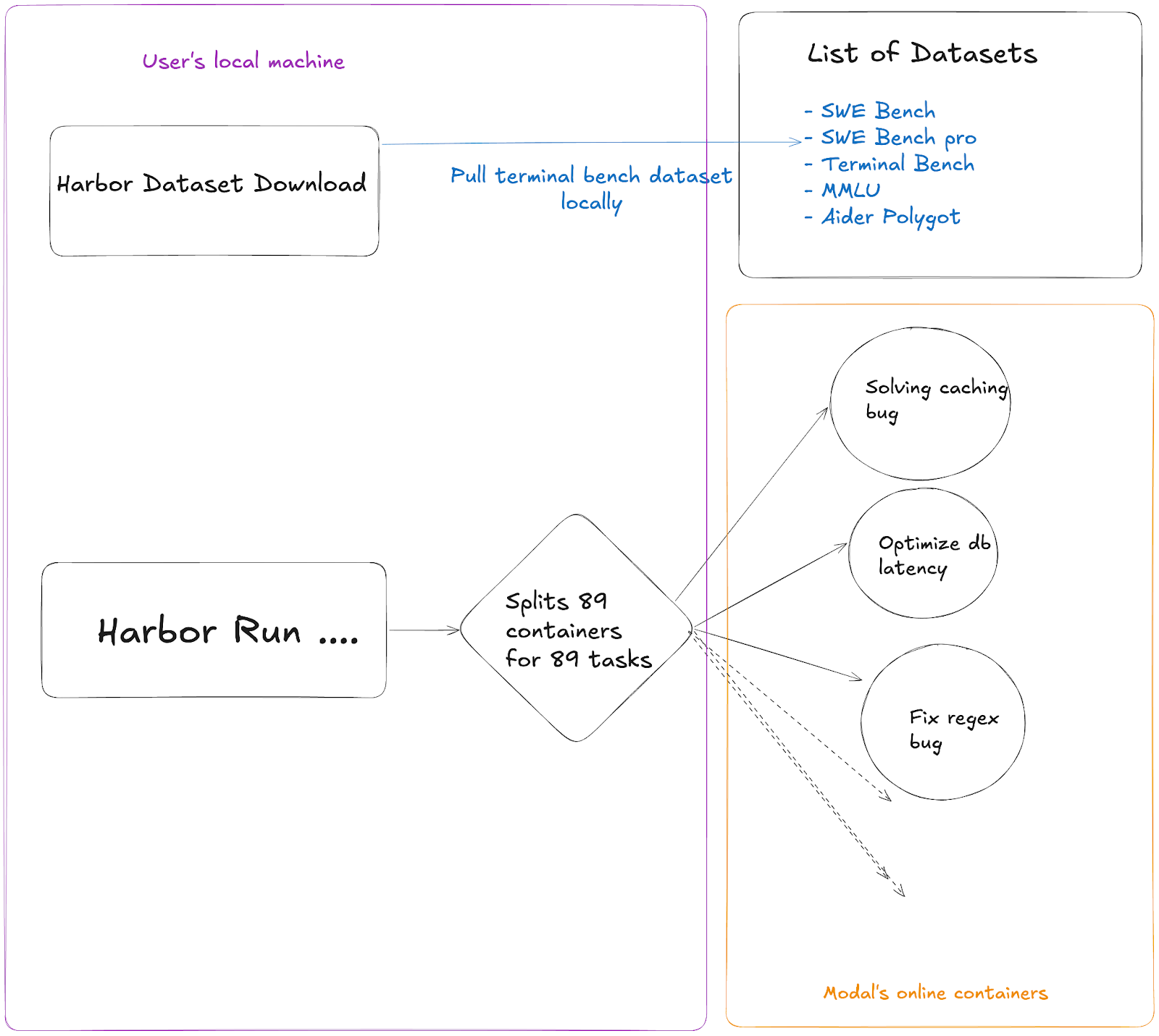
The primary evaluation dataset utilized in this repository is the Terminal Bench, a benchmark designed for AI agents operating within terminal environments. This benchmark comprises 89 diverse tasks, each varying in complexity and objective. The goal of this evaluation is to run the Cline CLI across all 89 tasks and determine the overall success rate, presented as an aggregate percentage score.
We run harbor locally which downloads the entire terminal bench dataset then spins up 89 different containers on Modal that handle each individual task of the terminal bench. This helps make the evals run much faster as all the tasks are parallelized.
1. Install Harbor
pip install harbor
# or
uv tool install harbor
2. Get API Keys
You need at least one provider API key. OpenRouter is recommended, it's been the most reliable for evals (other providers have been unreliable for local runs because of infra/rate limiting issues).
Ideally your .env file should look like this:
export CPUS=14
export MEMORY_MB=8192

export OPENROUTER_API_KEY="sk-or-v1-someotherwords"
export API_KEY=$OPENROUTER_API_KEY
We set a higher CPU and memory here because when harbor runs the tasks it runs each task.
Harbor uses API_KEY as the main variable to pull the API key of any provider.
3. Set Up Modal (for parallel cloud runs)
Modal lets you run 89+ tasks in parallel instead of sequentially. This is critical for fast iteration.
pip install modal
modal setup
# Follow the auth flow
Without Modal, you can run locally with Docker (--env docker) but it will be much slower as your own machine has to run these tasks sequentially which can easily take many hours for a single eval run. Whereas with Modal you can get a whole eval run done in 35-45 minutes. We are very thankful to Modal platform for supporting us through this whole process.
Verify your setup
source ~/.env
harbor run \\
  -d terminal-bench@2.0 \\
  -a cline-cli \\
  -m openrouter:anthropic/claude-opus-4.5 \\
  --env modal \\
  -n 3 \\
  -l 3
To ensure that your setup works correctly, make sure the quick test passes. This will just run 3 tasks in parallel, but since Harbor setup takes time, each task itself would take roughly 15 minutes and then they will all finish together. If this finishes correctly without errors, you can be certain that your setup is working.
Understanding the output
89/89 Mean: 0.573
━━━━━━━━━━━━━━━━━━━━━━━━━━━━━━━━━━━━━━━━
0:45:05 0:00:00- Mean = pass rate (0.573 = 57.3%)
- reward = 1.0 = tasks passed
- reward = 0.0 = tasks failed
- AgentTimeoutError = Cline ran out of time before completing the task
- VerifierTimeoutError = the verifier timed out checking the result
The Knobs You Can Turn
These are all passed via --ak (agent kwargs) flags to Harbor. They map to the Cline CLI adapter in our Harbor PR (#585). There are many knobs you can turn while you work with Cline, and they are all somewhat necessary as they help you tweak the agent and get a better feel for how to work with it, you can read documentation of agent kwargs.
The Hill Climbing Playbook
Step 1: Establish a Baseline
Run a full 89-task sweep with your current best config. Record the score. This is what you're trying to beat.
source ~/.env && export API_KEY=$OPENROUTER_API_KEY
harbor run \\
  -d terminal-bench@2.0 \\
  -a cline-cli \\
  -m openrouter:anthropic/claude-opus-4.6 \\
  --env modal \\
  --ak thinking=6000 \\
  --ak timeout=2400 \\
  -n 89 -l 89 \\
  --override-cpus $CPUS --override-memory-mb $MEMORY_MB
This command will run the entire harbor eval run with a timeout of 40 minutes(2400 seconds) for each task and then all the 89 tasks of terminal bench 2 in parallel. The total run should take roughly 40-50 minutes because of Modal setup time, task setup, CLI run etc.
Step 2: Analyze Failures
harbor jobs summarize ./jobs/LATEST --failed -m haikuThis command categorizes why tasks failed. Common failure patterns we found:
- AgentTimeoutError — Cline CLI's default 600s timeout was too short. Fix: --ak timeout=2400
- Missing expected files — Cline assumed success without verifying. Fix: PR #9154 (require verification before completion)
- Command exit codes not surfaced — Cline didn't know commands failed. Fix: PR #9156
- Long-running commands cut off — Build/test/train commands killed early. Fix: PR #9159
- Inference errors like: rate limits from providers, insufficient balance on the API provider etc
Your goal with any set of failures is to portfolio allocate them in a category and then bucket them. There are some failures that won’t be able to cover no matter how much you tweak the params etc. Atleast 25% of the failures are supposed to be this way. Those would need an actual step function improvement in the model itself but for the rest of the failures you would have to look at both the model doing something stupid or alternatively the model being configured the wrong way and missing some prompt/algorithmic logic.
To be able to differentiate and bucket the kind of failures you get is the real magic sauce of evals and is a question of your taste. If you are good at figuring out where your model went wrong you can take those lessons to post training and other AI steps as well.
Step 3: A/B Test Code Changes
This is where the real hill climbing happens which is improving Cline itself:
# Test main branch
harbor run -d terminal-bench@2.0 -a cline-cli \\
  -m openrouter:anthropic/claude-opus-4.5 \\
  --ak github_user=cline --ak commit_hash=main \\
  --ak thinking=6000 --ak timeout=2400 \\
  --env modal -n 89 \\
  --override-cpus $CPUS --override-memory-mb $MEMORY_MB
# Test a PR branch
harbor run -d terminal-bench@2.0 -a cline-cli \\
  -m openrouter:anthropic/claude-opus-4.5 \\
  --ak github_user=cline --ak commit_hash=saoud/fix-exit-codes \\
  --ak thinking=6000 --ak timeout=2400 \\
  --env modal -n 89 \\
  --override-cpus $CPUS --override-memory-mb $MEMORY_MB
Compare scores. If the PR improves the score you can consider it a success
Step 4: Use Pass@k When Results Are Noisy
Single runs can be noisy, scores vary by several percentage points run to run. If a change looks like a close call, run the same config 3–6 times and average to get a reliable signal. Use this whenever you need confidence in Steps 1–3, especially when comparing two configs that score within a few points of each other.
Our Feb 8 data for Opus 4.5 + thinking 6000 + double-check across 6 runs(this was before any changes):
0.49, 0.43, 0.45, 0.44, 0.48, 0.46 → Avg 0.458, Median 0.455
Because you are using harbor with Modal in this guide it doesn’t actually take much processing power on your machine so you can run many eval runs in parallel with nohup linux command.
We realize that sometimes you have a few guesses as to what tiny tweak can make the model and that you might want to try a few. different version of cline and run evals on them simultaneously. For this Cline supports --ak github_user=cline and --ak commit_hash=main as flags as that helps you test between different commits(without necessarily merging them into cline). The infra for this is not cheap but if you have read this far you are probably working at a company that can afford this.
Step 5: Iterate Iterate Iterate
Most of the above steps are fairly good at having a mental model of how large scale evals work, it will teach you basic failure modes of your agent and you can easily spend a couple days just working through those failure modes of the agent+model convo.
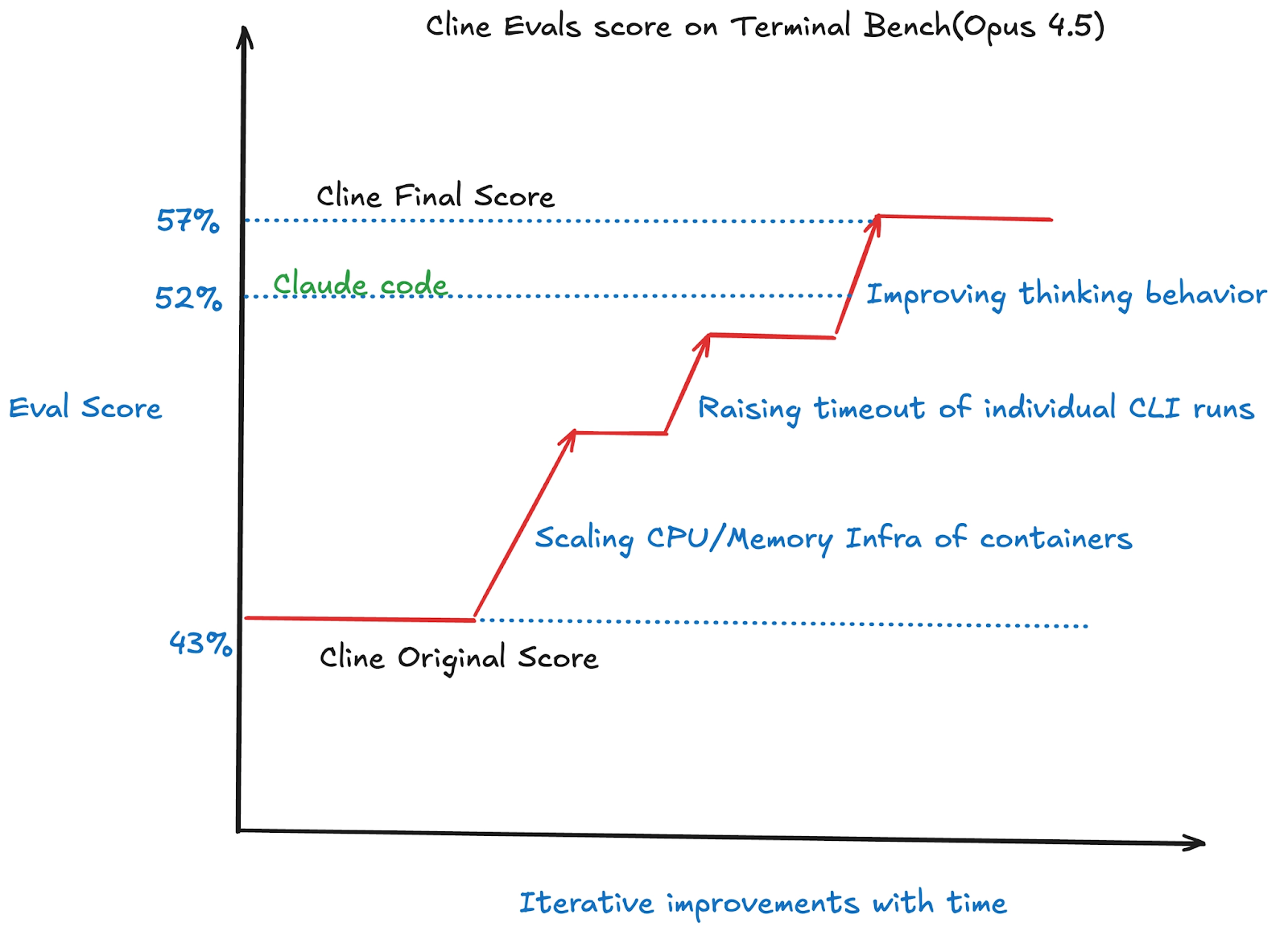
As an example we followed the steps above and our scores for Opus 4.5 out of the box started at 47% and then rose up to 57% by making tweaks to the eval harness, which is a borderline SOTA score and 5% above Claude Code.
What’s next
We're still climbing and exploring hill climbing and are automating runs on every new model drop so results publish within hours, expanding to other eval frameworks and other Harbor-compatible datasets. If you want to hill climb with us or run your model through our pipeline, reach out to Ara on X(@arafatkatze).